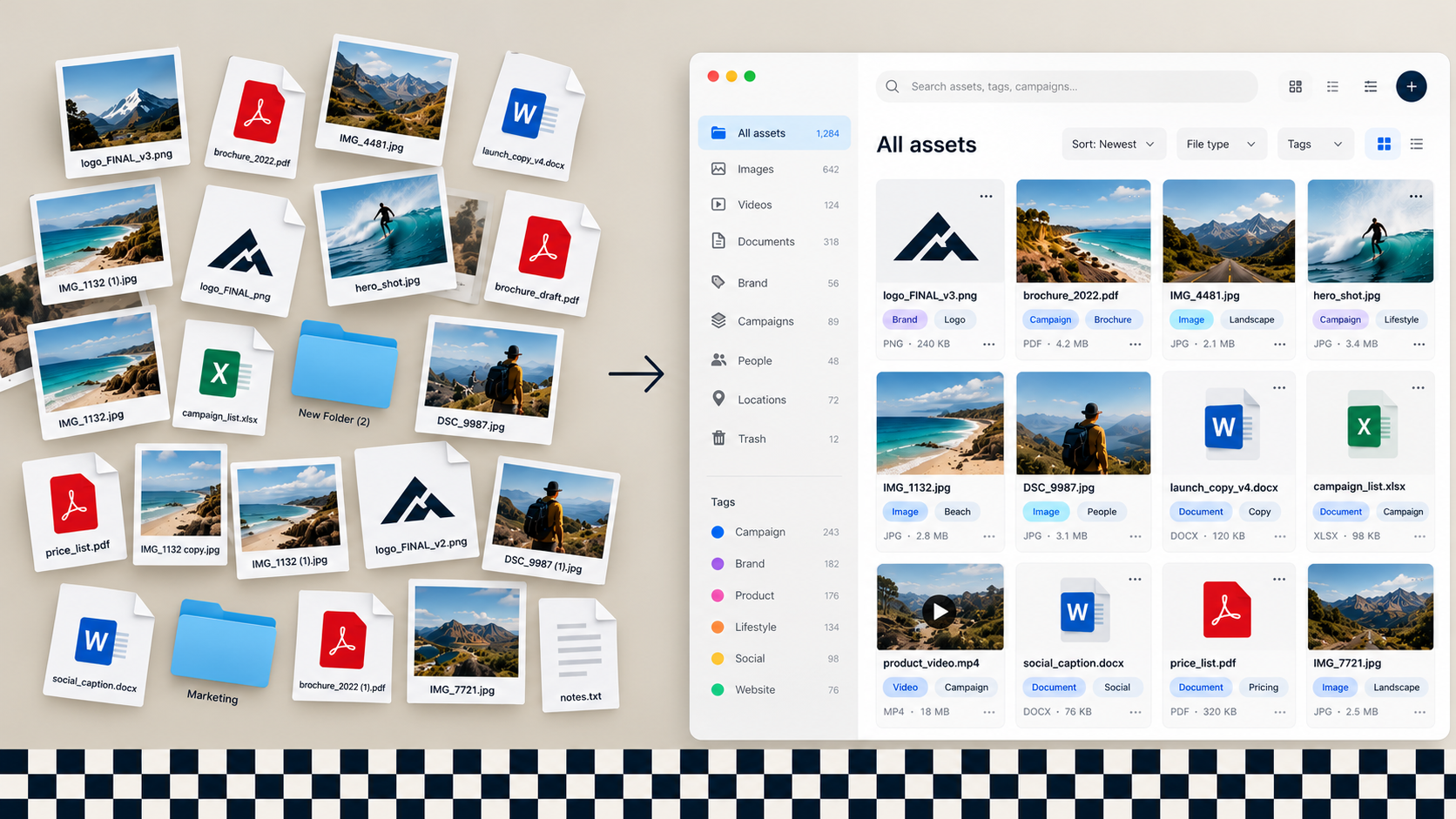
Your logos live in three Google Drive folders. The latest product shots are in someone's inbox. Your sales team is still sending the 2022 brochure.
That's not a content problem. It's an asset problem.
A digital asset management platform, or DAM, fixes that. This guide explains what a DAM is and when you need one. It also covers how to choose digital asset management software in Australia. Then it shows how to connect your DAM to tools like Canva and HubSpot.
What is digital asset management?
Digital asset management (DAM) is a central, searchable library for your brand files. That includes logos, photography, video, brand guidelines, templates, presentations, product sheets and approved copy. A DAM system stores those files and controls who can use them. It tracks versions and makes the right asset easy to find, which is the foundation for maintaining brand consistency.
The difference between a DAM and a shared drive is control. A shared drive holds files.
With a DAM, you can see which file your team approved and who can download it. It also shows where your team used it and when it expires.
Some vendors sell DAM as marketing asset management software, but the job is the same.
Signs you need a DAM
- People regularly ask "where's the latest logo?" in Slack or Teams
- Off-brand or outdated material keeps turning up in sales decks and social posts
- Agencies, distributors or franchisees need assets and you send them by email or WeTransfer
- You've paid for the same photography twice because nobody could find the original
- Usage rights on images and video are tracked in someone's head, or not at all
If two or more of those sound familiar, the time your team loses hunting for files is probably costing more than a DAM subscription.
What goes in a DAM system?
- Brand assets: logos, colour palettes, fonts, brand guidelines
- Imagery and video: product shots, lifestyle photography, b-roll, finished ads
- Templates: Canva templates, presentation decks, email and social templates
- Sales and marketing collateral: brochures, case studies, product sheets
- Documents: policies, contracts and approved boilerplate copy
The rule of thumb is simple. Approved, reusable, long-life assets go in the DAM. Works in progress and drafts stay in your project tools.
What to look for in a DAM platform
Most DAM platforms do the basics well. The differences that matter for an Australian marketing team are:
- Search and AI tagging. Modern platforms tag images and video automatically. Search for "beach" and you'll find beach photos, even if nobody tagged them.
- Permissions and sharing. User roles, public and private collections, and secure share links for agencies and partners.
- Brand portal. A clean, branded page where external partners can self-serve approved assets.
- Integrations. Connections to Canva, HubSpot, Microsoft 365, Google Workspace and your website's content management system (CMS). This is where most DAM projects succeed or fail.
- Pricing model. Some platforms charge per user, others by storage or bandwidth. Model your real usage before you sign.
- Local support and data residency. Check where the vendor hosts your data and whether its support team works Australian business hours.
Best DAM software for Australian businesses
There's no single best platform, and DAM solutions vary a lot in price and scope. Smaller teams can often start with tools they already pay for. Canva's Brand Kit, brand templates and shared folders cover a lot before you need a dedicated DAM.
Mid-sized teams usually compare dedicated digital asset management software such as Stockpress, Bynder, Brandfolder, Canto or IntelligenceBank. Enterprise teams with heavy video or web delivery needs look at Adobe Experience Manager Assets or Cloudinary.
Choose based on team size, external partners, video volume and the tools your DAM must connect to.
Stockpress in Australia
Stockpress is a DAM platform for marketing teams that want something simpler than enterprise software. Stockpress prices by storage and features, not seats, so every paid plan includes unlimited users. Recent updates have made it a stronger fit for marketing teams:
- Canva integration: search for approved Stockpress assets and add them to designs without leaving Canva.
- Content Portals: branded pages for sales teams, partners and press that update automatically when files change.
- AI image editing: remove objects, blur or replace backgrounds, extend images and upscale low-resolution files.
- AI and custom tagging: plus custom metadata fields, so your team finds files faster.
- Adobe InDesign plugin: open, edit and place files in InDesign, then save them back to Stockpress.
- Usage controls: expiry dates, watermarking, version control and guest upload pages.

Refuel is an Australian Stockpress partner, supporting digital asset management Australia-wide. We set it up, migrate your assets and connect it to the rest of your stack.
DAM for marketing agencies, media and entertainment
Some teams need more from a DAM than a brand library.
Marketing agency digital asset management is a good example. Agencies manage assets for many clients at once. They need separate collections per client, client-facing share links and a clear approval status on every file. Digital asset management for agencies also has to keep content creation moving across several brands at once.
DAM for media and entertainment teams is about volume and video. They work with large files and years of footage and photography, and their usage rights expire. A DAM media library needs fast search and rights tracking to keep up.
Education and not-for-profit teams often have thousands of event and campaign photos with consent requirements attached.
Does that sound like you? Then put three features at the top of your shortlist. Look for strong video handling, rights management and permissions by client or department.
Is SharePoint a digital asset management system?
Not really. SharePoint and Google Drive are good at storing and sharing files. With careful setup, they can cover the basics.
What they lack is the brand layer: visual search, AI tagging, usage rights, expiry dates, brand portals and approval flows.
If your problem is "we can't find things", better folder structure might be enough. If it's "people keep using the wrong things", you need a DAM.
How DAM fits with Canva and HubSpot
This is where DAM marketing workflows pay off. HubSpot isn't a DAM, but its free Canva app makes it a useful part of the stack. Here's how a connected Stockpress, Canva and HubSpot setup works:
- Stockpress holds your approved logos, photos, video and brand files
- Designers search Stockpress from inside Canva and build with approved assets and your Brand Kit
- Marketers click Design with Canva in HubSpot's editor to create emails, landing pages, social posts and ads. The finished design goes straight back into HubSpot
- The HubSpot Data Connector pulls CRM data into Canva to fill charts and create assets at scale
HubSpot's file manager hosts website and email files, but it can't govern a brand library. That's why your DAM digital library stays the single source of truth, with Canva connecting the two. The Canva app for HubSpot is free across all HubSpot hubs and tiers if you have a Canva plan.
How to roll out a DAM without it becoming another graveyard
- Audit. Map where your assets live today and which ones your team uses.
- Cull. Archive drafts, duplicates and anything off-brand. Most teams cut 50% or more.
- Structure. Agree on collections, naming conventions, tags and who owns what.
- Connect. Set up the integrations with Canva, HubSpot and your CMS.
- Migrate. Move approved assets in with metadata and usage rights attached.
- Train and govern. Short training for each user group, plus a quarterly review so the library stays clean.
The software is the easy part. Most DAMs fail because nobody did steps 2, 3 and 6.
Need help choosing or setting up a DAM?
Refuel helps Australian marketing teams choose the right DAM platform and set it up. We connect it to Canva and HubSpot so your team uses the assets in it. We're a Canva partner and HubSpot implementation specialist, so we know where the integrations break.
Book a DAM readiness call. In 30 minutes, we'll review where your assets live today. Then we'll tell you what you need: a DAM, better structure or better use of the tools you already have. Get in touch.
FAQ
What does a digital asset manager do?
A digital asset manager owns the library. They set the structure and metadata tagging rules and approve what goes in. They also manage permissions and keep the content current. In smaller teams it's usually part of a marketing coordinator's or brand manager's role.
How much does DAM software cost in Australia?
Costs range from close to free to several thousand dollars a month. At the low end, you make better use of Canva or existing storage. At the top end, you pay for an enterprise platform. Vendors usually price by users, storage or bandwidth, so pick the model that matches how your team and partners work.
Does HubSpot have digital asset management?
Not a full one. HubSpot's file manager hosts website and email files, but it lacks brand portals, rights management and AI tagging. Its free Canva app helps with design and publishing. Most teams still pair HubSpot with a dedicated DAM.
How long does a DAM implementation take?
For a mid-sized marketing team, plan on 4 to 8 weeks from audit to launch. Most of that time is the cull and structure work, not the software setup.