How shoppers find products using Google search has quietly changed. The Australian retailers who win the next few years are the ones treating their Merchant Center feed as the source of truth that AI reads from, rather than a compliance chore they tick off once.
For most of the last decade, optimising a Google Merchant Center (GMC) feed meant one thing: getting products approved so they could show in Shopping ads, then bidding on them. Compliance in, impressions out. The feed was plumbing.
That model is breaking. It isn't that Google Shopping ads are going away. It's that a second, much larger audience is now reading your feed, and it isn't a person scrolling a results page. It's a large language model answering a question.
The shift nobody quite noticed
In 2026, finding products online has moved towards conversational and AI-assisted shopping. The way people search has changed. They no longer just type "running shoes" into a search box when looking to purchase a pair of shoes. They ask, "what's a good waterproof trail shoe under $150 with decent ankle support for wide feet?" and they expect a real answer, with specific products to choose from.
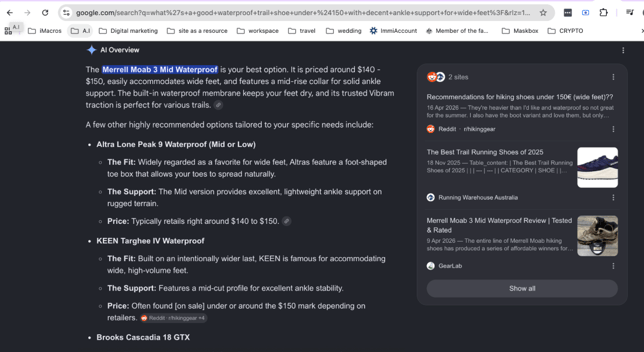
While there was a lot of initial hype around users buying products directly inside AI chats, it didn’t pan out the way the headlines promised. Once the dust settled on in-chat checkouts, everyone realised that the unglamourous product feed, something retail teams have been treating as a background IT task for years, was actually the most important piece of the puzzle.
Forrester's consumer research found that completing a purchase inside an answer engine was the least-adopted behaviour among regular AI users. People were happily using ChatGPT to research and compare, then heading to the merchant's own site to buy.
The detail that matters for your store is what happened next. When OpenAI stepped back from checkout, it leaned harder into the other half of the problem: letting merchants submit product feeds so their catalogue is fully represented in ChatGPT's recommendations. Google did the same, routing its AI surfaces (Gemini, AI Overviews, AI Mode, and classic Shopping) off the product data it already holds. Both of the biggest players landed on the same architecture. AI discovers products from structured feeds, then sends the shopper to you to buy.
The flashy feature retreated. Your feed, a boring, durable thing, became the whole game.
Why Merchant Center sits at the centre of it
Google's advantage in AI shopping isn't a clever chatbot. It's the Shopping Graph. A real-time map of products, prices, availability, and merchant relationships that Google has been building since the Froogle days in 2002. Every AI surface Google ships pulls from that graph, and the graph is fed by Merchant Center.
The real benefit here is efficiency. Optimise your GMC feed well and you're not improving one channel. You're improving how your products are understood by Shopping ads, free listings, AI Overviews, and Gemini at the same time, from one set of data. A single well-structured feed now does the work that used to take separate effort per channel.
That's the opportunity, and the risk is its mirror image. A thin or messy product feed won’t just hurt your rankings. It can completely exclude you from the conversation. If an AI model can’t easily figure out what your product is, who it’s for, and why it fits a specific prompt, it will simpy recommend a competitor it does understand. In an AI-driven search world, there is no second page of results to hide on. You either make the cut for the final answer, or you don’t exist.
AI reads your feed differently than the old algorithm did
This is the part most teams get wrong. They export their existing Google Shopping feed, point it at the new surfaces, and assume the job is done. But the matching logic isn't the same.
While traditional Google Shopping ads rely heavily on exact keyword matching and ad auction ids, AI search platforms now look at the deeper context and real-world intent behind a question.
When a shopper asks for "a quiet blender small enough for a studio apartment," nothing in that query is a keyword you bid on. The model is inferring intent and checking it against the attributes, categories, and descriptions in your feed. The product with the most complete, most specific, most human-readable data is the one that gets matched, because it's the one the model can reason about with confidence.
So the things that were always best practice in feed optimisation stop being polish and become the deciding factor.
Titles carry intent, not just keywords. A title like Pegasus 39 tells a model almost nothing. Nike Men's Air Zoom Pegasus 39 Running Shoes, Black/White, US 10 answers half a dozen implicit questions at once: brand, model, type, use case, colour, size. Front load the terms a shopper would actually say, keep it under 150 characters, and skip the ALL-CAPS promo noise that gets feeds flagged.
Categorise as deeply as the product allows. Google's product category is the required taxonomy, but product_type is the merchant defined hierarchy most people leave blank, and it's where you inject the language customers use. Go as deep as five levels, for example Clothing > Men's > Activewear > Shorts > Running Shorts. The deeper the signal, the more confidently AI can place your product in a specific question.
Treat optional attributes as mandatory wherever they drive a purchase. Colour, size, gender, age group, and material aren't optional for apparel in any meaningful sense. They're how the product gets matched and, frequently, why it gets approved at all. Build an attribute matrix per category:
- List what Google asks for
- Identify what a shopper actually filters on
- Fill those fields completely.
Pattern matters for a dress and is irrelevant for a drill. Dimensions and power source are the reverse.
Write descriptions like answers, not spec sheets. This is the single biggest shift for AI. "Men's t-shirt, cotton, crewneck" is a database row. "A soft, breathable cotton crew-neck made for everyday wear, with a classic fit that holds its shape wash after wash" is something a model can lift to answer "comfortable everyday t-shirts that won't shrink." Natural, benefit-led language contains the long-tail phrasing people use without any keyword stuffing, which Google reads as a low-quality signal anyway.
Feed the new richness Google is asking for. The 2026 product data spec keeps pushing towards a fuller picture of each product: a video attribute, product-level shipping detail, and a higher minimum image resolution that warnings already flag and that becomes enforced in early 2027.
Trust signals such as clear policy, returns, and shipping data increasingly factor into whether an AI recommends you over an equally relevant competitor. Richer data isn't vanity. It's how a model decides you're a safe recommendation.
Why the bar is still low for retailers
The uncomfortable truth is that very few merchants are doing any of this yet. Industry estimates put the share of small and mid-sized retailers actively optimising for AI discovery in the low single digits, and Australian stores are no further along than anyone else. That's a closing window rather than a permanent moat, but right now the gap between a competent feed and the average feed is enormous, and closing it is a known, repeatable process rather than a guessing game.
For a catalogue over a hundred products, you don't do this by hand. You group the catalogue by category, build a title template and attribute matrix for each group, apply them in bulk so every SKU has a strong structured baseline, then reserve human review and AI refinement for your hero products. New SKUs go through the same process the day they're added, not whenever someone remembers.
A practical starting point
If you want to know where your feed stands today, work in this order.
- Audit before you touch anything. Pull the current feed from Merchant Center and separate the two problem types. Compliance issues (disapprovals, missing required fields) make products invisible. Optimisation gaps (thin titles, blank product_type, short descriptions) make products unrecommendable. Fix compliance first.
- Rewrite titles by category, front-loading intent and the attributes shoppers say out loud.
- Fill product_type to the deepest honest level and verify Google's category is correct. A wrong auto-assigned category usually means your data is too thin for Google to understand the product.
- Complete the attribute matrix for every category you sell in.
- Rewrite descriptions as answers to the questions a real customer would ask.
- Add the 2026 richness: compliant images, video where you have it, and accurate shipping and policy data.
- Monitor at the SKU level, not just the campaign level, and re-audit whenever the catalogue changes.
The brands that treat their feed as a living asset, that’s complete and written for how people and models actually search, won't just spend less on ads and rank better in Shopping. They'll be the ones AI confidently recommends when a shopper asks a question a competitor's thin feed can't answer.
The storefront has moved. It's your feed now, and the only real question is whether it's ready to be read.
Want to know how your Merchant Center feed scores against this standard? Get in touch with the team at Refuel who can run a full audit covering compliance risks, optimisation gaps, and an AI-readiness score, then map out the highest-impact fixes for your catalogue.